Skema gives us new opportunities to get more value from our BIM investments.
Nicholas Kramer, Associate and Director of Inspire Design, LPA, Inc.

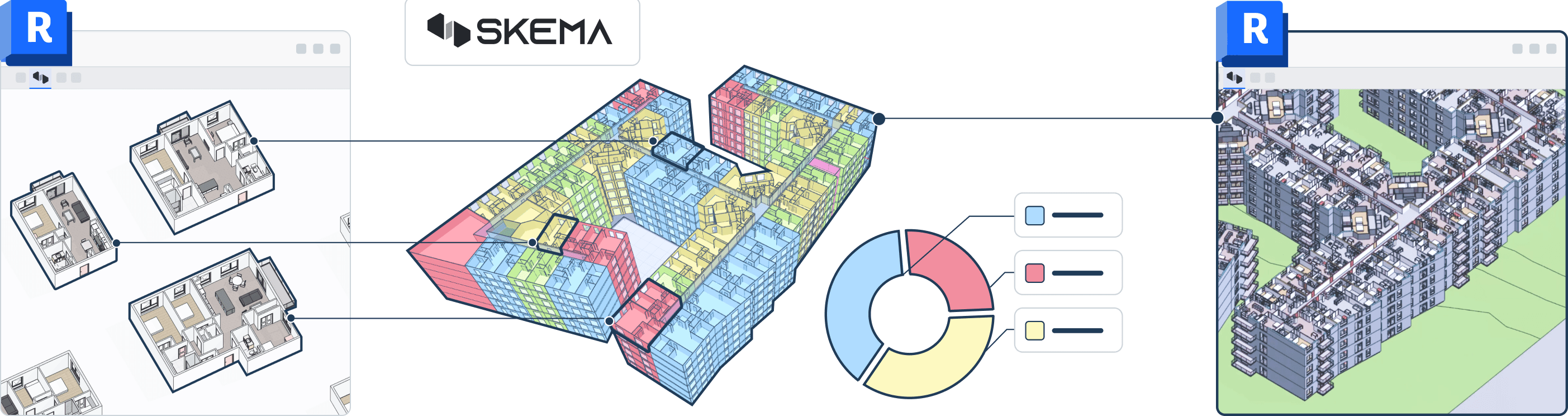
Capture proven design assemblies
Build a catalog of your data-rich design building blocks
Design in
browser
Quickly iterate layouts and design options
Track real-time design metrics
See the impact of changes as you work
Sync back
to Revit
Get fully integrated native Revit models you don't have to fix, in minutes
A design gets approved. Then it gets remodeled from scratch.
A design gets approved. Then it gets remodeled from scratch.
The break between early design and detail design has cost time, budget, and momentum for decades. What worked in concept doesn't carry into BIM — so teams remodel the same design twice
Time consuming
Error prone
Inefficient

The break between early design and detail design has cost time, budget, and momentum for decades. What worked in concept doesn't carry into BIM — so teams remodel the same design twice
Time consuming
Error prone
Inefficient

Solve design elements and reuse for every project after
Skema makes sure it works
Solve design elements and reuse for every project after. Skema makes sure it works
Faster delivery
More time for design
Knowledge that compounds

Faster delivery
More time for design
Knowledge that compounds

Skema Converts Schematic Designs into BIM Models in Minutes
From massing to modeling to documentation, in one smooth workflow

Step 1: Capture design data

Step 2: Compose New Designs

Step 3: Validate Design Decisions

Step 4: Deliver BIM in Minutes

Skema gives us new opportunities to get more value from our BIM investments.
Nicholas Kramer, Associate and Director of Inspire Design, LPA, Inc.
We've spent years working around the data problem Skema is solving. We believe the teams who get structured data right earlier in the design process will outperform the ones who don't.
Grant McCullagh, Managing Director, AEC Angels
Bringing both teams together for a focused session allowed us to connect the tools we already trust to a workflow that genuinely raises the quality of what and how we deliver solutions.
Andrew Balster, Principal, Design Strategy Director and Experience Strategy Market Leader, Hanbury
The ability to reuse design knowledge while keeping models structured is exactly what project teams need.
Principal, Integrated Practice
You can do in a day what would have taken weeks with previous methods
Michael Hodge
Skema addresses a very particular and pressing industry-wide problem that hasn't been tackled head-on before, eliminating a ton of pain-points for architects.
aec+tech





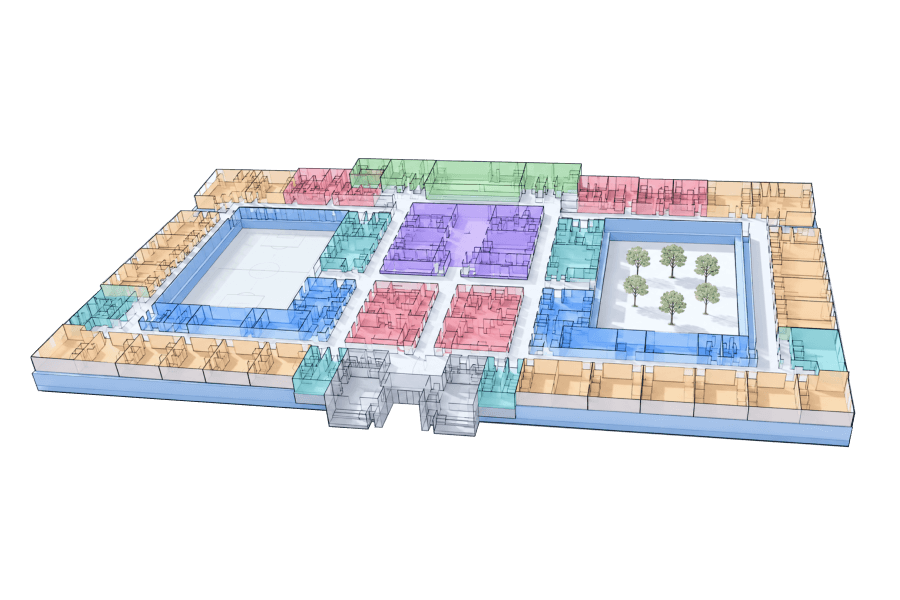
From retail to data centers, Skema turns schematic design into coordinated, engineering-aware BIM — while keeping your design knowledge working across every project
Retail
Residential
Healthcare
Hospitality
Education
Data Centers
Custom Projects

Retail
Residential
Healthcare
Hospitality
Education
Data Centers
Custom Projects
Roll out new locations faster without redesigning from scratch each time. Reuse a proven store prototype across every location — Skema adapts your layout to each site's footprint and constraints.
Retail
Residential
Healthcare
Hospitality
Education
Data Centers
Custom projects
With Skema's robust integrations, designers can work seamlessly across their favorite software without relying on heavy file exchanges.
Skema’s API unlocks automation opportunities for suppliers, engineers, and owners.

Revit
Edit in Skema, update in Revit. Edit in Revit, update in Skema. Industry-leading bi-directional sync with version control — with the highest-quality native Revit output in the market
Revit
Edit in Skema, update in Revit. Edit in Revit, update in Skema. Industry-leading bi-directional sync with version control — with the highest-quality native Revit output in the market
Revit
Edit in Skema, update in Revit. Edit in Revit, update in Skema. Industry-leading bi-directional sync with version control — with the highest-quality native Revit output in the market.
Revit
Edit in Skema, update in Revit. Edit in Revit, update in Skema. Industry-leading bi-directional sync with version control — with the highest-quality native Revit output in the market.

Rhino
Design in Rhino. Detail in Skema. Start with the massing you already have. Send it to Skema, where it becomes a fully resolved, BIM-ready layout in seconds. When you are ready, bring the refined model back into Rhino and keep designing. Your geometry stays intact the whole way through.
Rhino
Design in Rhino. Detail in Skema. Start with the massing you already have. Send it to Skema, where it becomes a fully resolved, BIM-ready layout in seconds. When you are ready, bring the refined model back into Rhino and keep designing. Your geometry stays intact the whole way through.
Rhino
Design in Rhino. Detail in Skema. Start with the massing you already have. Send it to Skema, where it becomes a fully resolved, BIM-ready layout in seconds. When you are ready, bring the refined model back into Rhino and keep designing. Your geometry stays intact the whole way through.

Grasshopper
Full API access lets you call Skema from scripts, update designs in real time. Bring parametric facades and custom geometries back into coordinated BIM, without scripting, manual remodeling, or any loss of design intent.
Grasshopper
Full API access lets you call Skema from scripts, update designs in real time. Bring parametric facades and custom geometries back into coordinated BIM, without scripting, manual remodeling, or any loss of design intent.
Grasshopper
Full API access lets you call Skema from scripts and update designs in real time. Bring parametric facades and custom geometries back into coordinated BIM, without scripting, manual remodeling, or any loss of design intent.
Grasshopper
Full API access lets you call Skema from scripts, update designs in real time. Bring parametric facades and custom geometries back into coordinated BIM, without scripting, manual remodeling, or any loss of design intent.

Miro
Bring your collaborative whiteboarding into the design workflow. Embed a live Skema viewport into any Miro board and your model shows up where decisions are actually being made.
Miro
Bring your collaborative whiteboarding into the design workflow. Embed a live Skema viewport into any Miro board and your model shows up where decisions are actually being made.
Miro
Bring your collaborative whiteboarding into the design workflow. Embed a live Skema viewport into any Miro board and your model shows up where decisions are actually being made.
Miro
Bring your collaborative whiteboarding into the design workflow. Embed a live Skema viewport into any Miro board and your model shows up where decisions are actually being made.

ShapeDiver
Turn Grasshopper scripts into no-code apps. Configure custom facades and push them into your Skema projects. Complex parametric models and tools become accessible firm-wide.
ShapeDiver
Turn Grasshopper scripts into no-code apps. Configure custom facades and push them into your Skema projects. Complex parametric models and tools become accessible firm-wide.
ShapeDiver
Turn Grasshopper scripts into no-code apps. Configure custom facades and push them into your Skema projects. Complex parametric models and tools become accessible firm-wide.

SketchUp
No-code solution for streamlining the workflow between SketchUp and Revit. Get serious BIM with SketchUp ease. Maintain data fidelity when moving between SketchUp, Skema, and Revit.
SketchUp
No-code solution for streamlining the workflow between SketchUp and Revit. Get serious BIM with SketchUp ease. Maintain data fidelity when moving between SketchUp, Skema, and Revit.
SketchUp
No-code solution for streamlining the workflow between SketchUp and Revit. Get serious BIM with SketchUp ease. Maintain data fidelity when moving between SketchUp, Skema, and Revit.

For years I was skeptical that any tool could truly maintain coordination across shell and interiors simultaneously — without the rework that comes when you finally land in Revit. Skema's analytical model changed that. Project stays coordinated while both tracks are running in parallel.
Quick answers to common questions
Quick answers to common questions,
all in one place
Does Skema train AI on our design data?
Why does Skema work with native Revit instead of a format like IFC?
Revit models carry more than geometry. They carry the parametric relationships, families, and metadata that make a design buildable, and that intelligence is what makes a firm's past projects worth reusing in the first place. Converting to IFC and back can lose that intelligence along the way. Skema works with native Revit data directly, so the quality of your firm's original design work carries through.
How does Skema handle sustainability analysis?
Can LynAI integrate with our existing tools?
Does Skema train AI on our design data?
Why does Skema work with native Revit instead of a format like IFC?
Revit models carry more than geometry. They carry the parametric relationships, families, and metadata that make a design buildable, and that intelligence is what makes a firm's past projects worth reusing in the first place. Converting to IFC and back can lose that intelligence along the way. Skema works with native Revit data directly, so the quality of your firm's original design work carries through.
How does Skema handle sustainability analysis?
Can LynAI integrate with our existing tools?
Skema Converts Schematic Designs into BIM Models in Minutes From massing to modeling to documentation, in one smooth workflow
Step 1: Capture design data
Step 2: Compose New Designs
Step 3: Validate Design Decisions
Step 4: Deliver BIM in Minutes

Capture proven design elements
Real Revit elements pulled
in, not generic shapes


Design in
browser
Quickly iterate layouts and design options

Build reports
and charts
Real Revit elements pulled
in, not generic shapes

Sync back
to Revit
Real Revit elements pulled
in, not generic shapes
Build concept, options, and production-ready BIM in one place
AI in AEC
BIM Automation
Generative Design for AEC
Generative Design
for AEC
Move from schematic to coordinated BIM — without the redrawing, the rework, or the wasted weeks in between.
AI in AEC
BIM Automation
Generative Design
for AEC


